With few exceptions, data groups must be defined in a device template file in order for them to be available for use on a remote device. Which data groups are defined by a device template file depends on protocol, device type, and unique configuration.
CygNet distributes sample device template files for its EIEs, each of which typically serves one or more hardware models along with applicable firmware. Therefore, the data groups described in the table below are only those data groups defined by CygNet in sample device template file(s). Your template(s) might not include some of the data groups described below. Device template files exist to enable users to customize device configurations; however, CygNet is not responsible for changes made by users.
For information about data group definitions and device template files, see Device Template Files.
| Data Group Type | Usage Notes |
|---|---|
|
CmdDev |
"Command - Device" data group writes a value to a device-level topic. |
|
CmdNode |
"Command - Edge Node" writes a value to an edge-node topic. |
|
CfgDg |
"Configurable Data Group" |
|
DynaCard |
"Dynagraph Card" |
|
Topic1 |
"Topic 1" is a sample data group demonstrating how to set up a data group. |
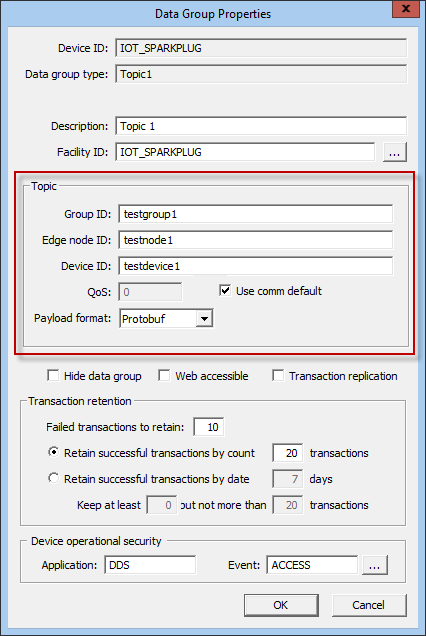
In the IoT Sparkplug EIE, each data group corresponds to a subscription to an MQTT topic. IoT Sparkplug EIE data groups include properties and fields specific to the IoT Sparkplug device.
Note: The IoT Sparkplug EIE "Dynagraph Card" (DynaCard) data group requirements differ slightly from other data group types. For more information, see IoT Sparkplug EIE Dynagraph Data Group.
The following table lists and describes properties specific to the IoT Sparkplug EIE Data Group Properties dialog page. See the IoT Sparkplug EIE Dynagraph Data Group topic for specific requirements for DynaCards.
| Property | Description |
|---|---|
| Topic | |
|
Group ID |
A Sparkplug topic group ID is a logical grouping of MQTT Edge of Network (EoN) nodes into the MQTT server and back out to the subscribing clients. |
|
Edge node ID |
A Sparkplug topic edge node ID uniquely identifies the MQTT Edge of Network (EoN) node within the infrastructure. |
|
Device ID |
A Sparkplug topic device ID is an optional field entered by the user that identifies a device attached to the MQTT EoN node. For more information, see Topic Options for Data Group Properties Dialog. |
|
QoS |
When Use comm default is unchecked, the data group uses the value entered in this field. Values are:
|
|
Use comm default |
When checked, the data group uses the Default QoS value specified in the device editor of the associated MQTT comm device. When unchecked, the data group uses the value specified in the QoS field of the Data Group Properties dialog. For more information, see MQTT Comm EIE. |
|
Payload format |
Format of the payload data. Options are:
|
IoT Sparkplug EIE non-DynaCard data groups can subscribe to either node level or device level topics. In the Topics section of the Data Group Properties dialog:
spBv1.0/[Group ID]/DBIRTH/[Edge node ID]/[Device ID]
spBv1.0/[Group ID]/DDEATH/[Edge node ID]/[Device ID]
spBv1.0/[Group ID]/DDATA/[Edge node ID]/[Device ID]
spBv1.0/[Group ID]/NBIRTH/[Edge node ID]
spBv1.0/[Group ID]/NDEATH/[Edge node ID]
spBv1.0/[Group ID]/NDATA/[Edge node ID]
Note: For IoT Sparkplug EIE DynaGraph Data Groups requirements, see Dynagraph Card Topic Requirements.
The IoT Sparkplug EIE supports reading compressed or uncompressed Sparkplug B payloads. It supports zlib and gzip compression formats.
A payload file may include a timestamp for each data item, a timestamp for the entire payload, or no timestamp at all. When processing points, CygNet will assign timestamps in this order:
The timestamp locations are defined in the Sparkplug specification.
When payload data indicates the connection between the MQTT server and the remote device has been lost, CygNet can be configured to set all points associated with the topic to unreliable. This feature is enabled in the template file for each data group using the setUnreliableOnLostConnection attribute. If true, all points associated with the topic are set to unreliable. Otherwise the point status is unchanged.
The Sparkplug node and device DEATH messages are used to indicate a lost connection.
The IoT Sparkplug driver automatically requests a rebirth if it receives data for an alias that was not defined in the most recent BIRTH message. When an unknown alias is received, the mapping from alias to item is considered unreliable, so no data from the payload is processed.
A user can request a rebirth manually through the "Command – Device" (CmdDev) or "Command – Edge Node" (CmdNode) data group using the data group editor or via a UIS command. See Command-Type Data Groups for more information.

|
|
|

